
 Elettrotecnica e non solo (admin)
 Un gatto tra gli elettroni (IsidoroKZ)
 Esperienza e simulazioni (g.schgor)
 Moleskine di un idraulico (RenzoDF)
 Il Blog di ElectroYou (webmaster)
 Idee microcontrollate (TardoFreak)
 PICcoli grandi PICMicro (Paolino)
 Il blog elettrico di carloc (carloc)
 DirtEYblooog (dirtydeeds)
 Di tutto... un po' (jordan20)
 AK47 (lillo)
 Esperienze elettroniche (marco438)
 Telecomunicazioni musicali (clavicordo)
 Automazione ed Elettronica (gustavo)
 Direttive per la sicurezza (ErnestoCappelletti)
 EYnfo dall'Alaska (mir)
 Apriamo il quadro! (attilio)
 H7-25 (asdf)
 Passione Elettrica (massimob)
 Elettroni a spasso (guidob)
 Bloguerra (guerra)
Server NTP errore in ricezione


16 messaggi
• Pagina 1 di 2 • 1, 2
0
voti
[1] Server NTP errore in ricezione
 da
da  apollo17 » 16 set 2023, 10:06
Salve, realizzato orologio con collegamento NTP, di fatto, anche da verifiche fatte, non " spacca mai il secondo". Ulima cifra dei secondi è ballerina, aleatoria e tende a darti quasi sempre, difficile da quantizzare per quante ore; azzardo al 70%: meno 1 secondo. Nella sua imprecisione, rispetta e visualizza, ripeto quasi sempre meno un secondo rispetto all 'ora esatta. Ovvio il segnale di base NTP preso da più server, ne ho provati diversi, è sacrosanto, è precisissimo, ma nel collegamento e più nelle librerie preposte si perde 1 secondo. Chi di voi ha rilevato tale comportamento? Soluzione? Grazie


0
voti
[2] Re: Server NTP errore in ricezione
da  ThEnGi » 16 set 2023, 11:16
Su che piattaforma stai lavorando?
Ho notato che le librerie di Arduino (esempio) sono tutto tranne che ottimizzate per il real time.
Io ho sempre usato un RTC abbinato ad un NTP, in più mi preoccupavo di lanciare l'aggiornamento appena scattato il secondo e non in un momento casuale.
Inoltre ha poco senso aggiornare l'ora ogni secondo....
Saluti

Ho notato che le librerie di Arduino (esempio) sono tutto tranne che ottimizzate per il real time.
Io ho sempre usato un RTC abbinato ad un NTP, in più mi preoccupavo di lanciare l'aggiornamento appena scattato il secondo e non in un momento casuale.
Inoltre ha poco senso aggiornare l'ora ogni secondo....
Saluti


0
voti
[3] Re: Server NTP errore in ricezione
da apollo17 » 16 set 2023, 12:09
intendi x piattaforma Windons 10. Aggiorno ogni 1 minuto timeClient.setUpdateInterval(60000); ma qualsiasi valore non influisce, sul log monitor seriale orario perfetto sincronizzato con times.is e orologio PC sincronizzato con inrim.it. Ma sul display ho quasi sempre meno 1 secondo, Sono d'accordo su rtc ma non vorrei utilizzarla per tale progetto. La utilizzo invece abbinata al neo gps e li spacca il secondo. A te funziona con rtc e ntp, hai un orario perfettamente e sempre sincronizzato con times.is e/o inrim ? La mia perplessità e se quando "leggo "da NTP poi memorizzo su rtc mi porto un segnale aleatorio a volte perfetto a volte con meno 1 secondo. Dove sbaglio? Grazie
0
voti
[4] Re: Server NTP errore in ricezione
da ThEnGi » 16 set 2023, 12:30
Iniziamo da uno schema fidocad e il codice che usi. Senza faccio fatica a capirti.
Per piattaforma intendo quale Arduino stai usando, ma rispondi con uno schema e vediamo se ci sono altri pezzi che influenzano.
Ciao
Per piattaforma intendo quale Arduino stai usando, ma rispondi con uno schema e vediamo se ci sono altri pezzi che influenzano.
Ciao
0
voti
[5] Re: Server NTP errore in ricezione
da apollo17 » 16 set 2023, 13:45
Ciao non è Arduino ma WEMOS D1R2 con esp8266, va benissimo , nessun problema wifi. Poi lo sche è di una semplicità estrema: Wemos D1R2 sempre perfettamente funzionante, ( molte in commercio non vanno bene) e un Display LCD collegato su SDA e SLC. Stop. Come piattaforma IDE 2.2.1 e anche IDE 1.8.57 per vecchi sketch .
carico sketch con entrambi senza problemi. Grazie
carico sketch con entrambi senza problemi. Grazie
0
voti
[6] Re: Server NTP errore in ricezione
da ThEnGi » 17 set 2023, 17:25
Ringrazio chiuque sia stato per il -1..... 
Senza codice è diffice, ma forse un dubbio lo ho ! (ho avuto questo problema)
siccome è un codice "Real-time" deve essere eseguito in meno di 1000ms, se il tuo codice è più lento ti esce quel "Bug" che riporti. A cui va aggiunto il fatto che non viene eseguito in sincronia con il tempo.
TI lascio uno schema spero possa essere d'aiuto (non in scala)
Sappi però che il tempo per fare lo schema (brutto ) lo ho impiegato, ora finche non posti uno schema e un codice correttamente commentato e formattato. Io non risponderò ulteriormente
Senza codice è diffice, ma forse un dubbio lo ho ! (ho avuto questo problema)
siccome è un codice "Real-time" deve essere eseguito in meno di 1000ms, se il tuo codice è più lento ti esce quel "Bug" che riporti. A cui va aggiunto il fatto che non viene eseguito in sincronia con il tempo.
TI lascio uno schema spero possa essere d'aiuto (non in scala)
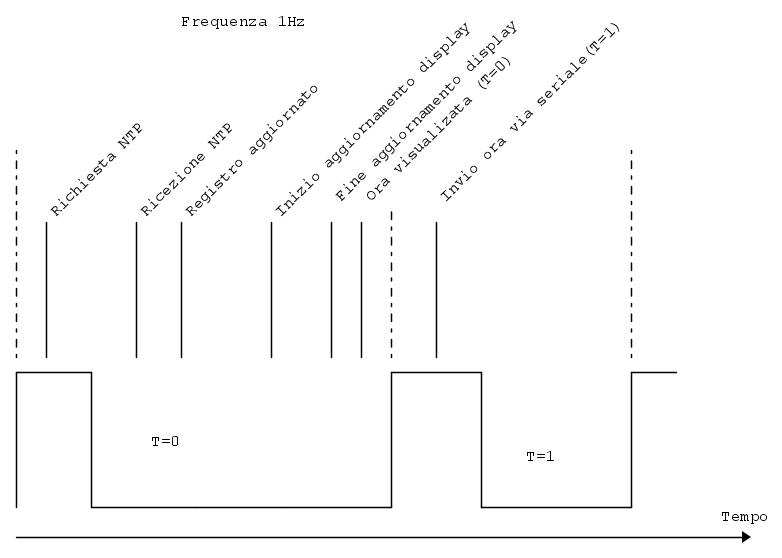
Sappi però che il tempo per fare lo schema (brutto
) lo ho impiegato, ora finche non posti uno schema e un codice correttamente commentato e formattato. Io non risponderò ulteriormente 0
voti
[7] Re: Server NTP errore in ricezione
da apollo17 » 1 ott 2023, 11:06
ThEngi, scusami ma non avevo visto il tuo disegno, oltretutto ci hai messo pure impegno. Si grazie è proprio quello che succede, ho provato diversi sketch anche con amici ma ho sempre nell'arco della giornata al 70 % minimo meno 1 secondo. Provato anche con istruzione per fare più interrrogazioni al server ma niente. E' la connessione che non è corretta, Testato oltre con wifi di rete anche con router con sim uguale sempre meno 1. Ecco lo sckect e schema, un capolavoro di disegno,  . Ovvio mancano le alimentazioni tutto a 5 vcc e wemos da alimentatore esterno 9 Vcc. provato come già detto anche così : timeClient.setTimeOffset(7200);
// AGGIONAMENTO ORA ========================================
// Setta intervallo di aggiornamento ntp a 5 min
// timeClient.setUpdateInterval(300000);
// Setta intervallo di aggiornamento ntp a 1 min
// ============
//timeClient.setUpdateInterval(60000); //
A questo punto, ecco aiuto, o come risolvere problema, magari a risolvere, oppure come e dove aggiungere ad esempio demtro una variabile: +0.5 o + 1 secondo; tenendo conto che la maggior parte delle giornata sta a meno 1. Grazie
======================inizio sketch
. Ovvio mancano le alimentazioni tutto a 5 vcc e wemos da alimentatore esterno 9 Vcc. provato come già detto anche così : timeClient.setTimeOffset(7200);// AGGIONAMENTO ORA ========================================
// Setta intervallo di aggiornamento ntp a 5 min
// timeClient.setUpdateInterval(300000);
// Setta intervallo di aggiornamento ntp a 1 min
// ============
//timeClient.setUpdateInterval(60000); //
A questo punto, ecco aiuto, o come risolvere problema, magari a risolvere, oppure come e dove aggiungere ad esempio demtro una variabile: +0.5 o + 1 secondo; tenendo conto che la maggior parte delle giornata sta a meno 1. Grazie
======================inizio sketch
- Codice: Seleziona tutto
#include <LibSerial.h>                         // Libreria seriale
#include <ESP8266WiFi.h>                // per famiglia esp8266

#include <NTPClient.h>                      // Libreria NTPCLIENT
#include <WiFiUdp.h>                        // Libreria WiFiUdp
#include <LiquidCrystal_I2C.h>      // Libreria I2C LCD

LibSerial MySerial;

#define Pin_Blink 2         //   pin 4   di wemos
#define LED_SOLAR 1                   // -----> LED SOLAR

// Impostazione diritti di accesso
const char* ssid            = "xxx";
const char* password = "yyy";

LiquidCrystal_I2C lcd(0x27, 20, 4);

WiFiUDP ntpUDP;
// NTPClient timeClient(ntpUDP, "pool.ntp.org");
//NTPClient timeClient(ntpUDP, "time.inrim.it");
NTPClient timeClient(ntpUDP, "time.inrim.it");   // 0.it.pool.ntp.org    time.inrim.it
String formattedDate;              // Data + tempo
String dayStamp;
String timeStamp;
String formattedTime;              // solo tempo

//Week Days
String weekDays[7]={"Dom", "Lun", "Mar", "Mer", "Gio", "Ven", "Sab"};

//Month names
String months[12]={"Gen", "Feb", "Mar", "Apr", "Mag", "Giu", "Lug", "Ago", "Set", "Ott", "Nov", "Dic"};


// ----------------------------------------------------------------------------------------------------------------------------------------------
// EXIT_ERROR
// ----------------------------------------------------------------------------------------------------------------------------------------------
String Exit_Error(byte Codice_Errore)
{
        switch (Codice_Errore)
        {
                case 0:  return "IDLE_STATUS" ;
                case 1:  return "NO_SSID_AVAILABLE";
                case 2:  return "SCAN_COMPLETED";
                case 3:  return "CONNECTED";
                case 4:  return "CONNECT_FAILED";
                case 5:  return "CONNECTION_LOST";
                case 6:  return "DISCONNECTED";
                default: return "CODE UNKNOWN";
        }
}
// ----------------------------------------------------------------------------------------------------------------------------------------------
// LOOP
// ----------------------------------------------------------------------------------------------------------------------------------------------
void loop()
{
        while(!timeClient.update())
                timeClient.forceUpdate();

        time_t epochTime = timeClient.getEpochTime();                  //
        formattedTime = timeClient.getFormattedTime();
        formattedDate = timeClient.getFormattedDate();
        int splitT = formattedDate.indexOf("T");
        dayStamp = formattedDate.substring(0, splitT);

        MySerial.Write_Message(formattedTime,false,true);
        MySerial.Write_Message(formattedDate,false,true);
        MySerial.Write_Message(dayStamp,false,true);

        //---------------------------------------------------------
        //  UPG per Week e MM in chiaro

        String weekDay = weekDays[timeClient.getDay()];
        MySerial.Write_Message("Week Day: ",false,false);
        MySerial.Write_Message(weekDay,false,true);

        //Get a time structure per ricostruire la data
        struct tm *ptm = gmtime ((time_t *)&epochTime);

        int monthDay = ptm->tm_mday;                  // Giorno
        int currentMonth = ptm->tm_mon+1;              // Mese
        String currentMonthName = months[currentMonth-1];
        int Anno = ptm->tm_year+1900;                  // Anno

        MySerial.Write_Other("Month day: ",monthDay,false,false,true);
        MySerial.Write_Other("Month: ",currentMonth,false,false,true);
        MySerial.Write_Message("Month name: ",false,false);
        MySerial.Write_Message(currentMonthName,false,true);


        lcd.setCursor(3,0);    // CURSORE   DATA
        lcd.print(weekDay);
        lcd.print(" ");
        lcd.print(monthDay);
        lcd.print(" ");
        lcd.print(currentMonthName);
        lcd.print(" ");
        lcd.print(Anno);

        //--------------------------------------------------------------
        //timeStamp = formattedDate.substring(splitT+1, formattedDate.length()-1);
        lcd.setCursor(6,2);                      // cursor a c3/r1
        lcd.print(formattedTime);          // Orario
        //delay(1000);                                      // non dovrebbe essere
}

// ----------------------------------------------------------------------------------------------------------------------------------------------
// SETUP
// ----------------------------------------------------------------------------------------------------------------------------------------------
void setup()
{
    unsigned long ST_TM_OUT= millis()  / 1000;              // Setting time start
    unsigned long END_TM_OUT = 0x00L;
    unsigned long Time_Out = 20;
    int                        Cod_Err;                          // errore status
    int                        Cod_TM;                           // Time_out
    String                 MesError;

    pinMode(Pin_Blink,OUTPUT);
    digitalWrite(Pin_Blink,HIGH);

    pinMode (LED_SOLAR,INPUT_PULLUP);
    MySerial.Start_Serial(115200,"NTP CLOCK START",true);

    lcd.init();
    lcd.backlight();
    lcd.setCursor(4,0);
    lcd.print("Cucciolo: WAIT");
    MySerial.Write_Message("Connecting to --> ",true,false);
//        String SID = ssid;
//        MySerial.Write_Message(SID,false,true);
    MySerial.Write_Message(ssid,false,true);
    MySerial.Write_Message("Blink durante la connessione",false,true);

    WiFi.begin(ssid, password);        // Wait for connection

    while (WiFi.status() != WL_CONNECTED)
    {
      digitalWrite(Pin_Blink,HIGH);           // Blink for wait
      delay(500);                                            // time 500 ms
      digitalWrite(Pin_Blink,LOW);
      delay(500);

      END_TM_OUT = (millis() /1000)  - ST_TM_OUT;

      // Si connette entro Time_Out ??
      if (END_TM_OUT > Time_Out)
      {
          digitalWrite(Pin_Blink,HIGH);
          Cod_Err = WiFi.status();
          MesError = Exit_Error(Cod_Err);
          MySerial.Write_Other("WIFI status: ",Cod_Err,false,false,true);
          MySerial.Write_Message(MesError,false,true);
          MySerial.Write_Message("Or Time_out",false,true);

          MySerial.Stop_Session(true,false);
          while (1)
                  ESP.wdtFeed();
      }
    }

    // ok connesione
    MySerial.Write_Message("WIFI CONNECTED! IP --> ",true,false);
    String LP = WiFi.localIP().toString();
    MySerial.Write_Message(LP,false,true);

    // WiFi.disconnect();
    // MySerial.Write_Message("Disconesso" ,true,true);
    lcd.setCursor(1,1);
    lcd.print(WiFi.localIP());
    delay(2000);                      // ritardo per visualizzazione
    lcd.setCursor(0,0);
    lcd.clear();

    timeClient.begin();                // start client

    if (digitalRead(LED_SOLAR) == HIGH)
      timeClient.setTimeOffset(3600);
    else
      //         ora solare (7200 per legale)
      timeClient.setTimeOffset(7200);
}

0
voti
[8] Re: Server NTP errore in ricezione
da apollo17 » 10 ott 2023, 18:57
Ciao, va bene sono stato cattivo  e mi avete punito
  Inviato sketch e disegno, in ritardo si ma avuto piccolo problemino odontoiatrico ma appena possibile un risposta anche negativa, non si può fare, o magari parzialmente positiva, meglio ancora un buona indicazione su come fare test me la merito!!
e mi avete punito Inviato sketch e disegno, in ritardo si ma avuto piccolo problemino odontoiatrico ma appena possibile un risposta anche negativa, non si può fare, o magari parzialmente positiva, meglio ancora un buona indicazione su come fare test me la merito!! 0
voti
[9] Re: Server NTP errore in ricezione
da ThEnGi » 11 ott 2023, 8:27
Non è una questione di cattiveria o meno, è che stai chiedendo di debuggare un codice di 200 linee in cui usi librerie "non standard" e con una schematica non congrua.
Questi cosa sono ? li citi poi non li usi ?
Il problema te lo ho già detto: è il tempo che intercorre tra la scrittura sul display e l'invio a seriale. e a te sembra che sia sbagliato
Questa non è la soluzione:
Ho solo spostato l'invio a seriale dopo l'invio a display.
Ma il codice va migliorato e ottimizzato per girare in "Real time", ovvero non puoi tutte le volte aggiornare il giorno o l'ora serve inserire degli "IF" per aggiornare solo quando serve !
Sia il seriale che la scrittura a display sono azioni lente (per non parlare delle varie conversioni che fai), in un applicazione veloce devono essere evitate.
Questi cosa sono ? li citi poi non li usi ?
- Codice: Seleziona tutto
#define Pin_Blink 2         //   pin 4   di wemos
#define LED_SOLAR 1                   // -----> LED SOLAR
Il problema te lo ho già detto: è il tempo che intercorre tra la scrittura sul display e l'invio a seriale. e a te sembra che sia sbagliato
Questa non è la soluzione:
- Codice: Seleziona tutto
#include <LibSerial.h>                         // Libreria seriale
#include <ESP8266WiFi.h>                // per famiglia esp8266

#include <NTPClient.h>                      // Libreria NTPCLIENT
#include <WiFiUdp.h>                        // Libreria WiFiUdp
#include <LiquidCrystal_I2C.h>      // Libreria I2C LCD

LibSerial MySerial;

#define Pin_Blink 2         //   pin 4   di wemos
#define LED_SOLAR 1                   // -----> LED SOLAR

// Impostazione diritti di accesso
const char* ssid            = "xxx";
const char* password = "yyy";

LiquidCrystal_I2C lcd(0x27, 20, 4);

WiFiUDP ntpUDP;
// NTPClient timeClient(ntpUDP, "pool.ntp.org");
//NTPClient timeClient(ntpUDP, "time.inrim.it");
NTPClient timeClient(ntpUDP, "time.inrim.it");   // 0.it.pool.ntp.org    time.inrim.it
String formattedDate;              // Data + tempo
String dayStamp;
String timeStamp;
String formattedTime;              // solo tempo

//Week Days
String weekDays[7]={"Dom", "Lun", "Mar", "Mer", "Gio", "Ven", "Sab"};

//Month names
String months[12]={"Gen", "Feb", "Mar", "Apr", "Mag", "Giu", "Lug", "Ago", "Set", "Ott", "Nov", "Dic"};


// ----------------------------------------------------------------------------------------------------------------------------------------------
// EXIT_ERROR
// ----------------------------------------------------------------------------------------------------------------------------------------------
String Exit_Error(byte Codice_Errore)
{
        switch (Codice_Errore)
        {
                case 0:  return "IDLE_STATUS" ;
                case 1:  return "NO_SSID_AVAILABLE";
                case 2:  return "SCAN_COMPLETED";
                case 3:  return "CONNECTED";
                case 4:  return "CONNECT_FAILED";
                case 5:  return "CONNECTION_LOST";
                case 6:  return "DISCONNECTED";
                default: return "CODE UNKNOWN";
        }
}
// ----------------------------------------------------------------------------------------------------------------------------------------------
// LOOP
// ----------------------------------------------------------------------------------------------------------------------------------------------
void loop()
{
        while(!timeClient.update())
                timeClient.forceUpdate();

        time_t epochTime = timeClient.getEpochTime();                  //
        formattedTime = timeClient.getFormattedTime();
        formattedDate = timeClient.getFormattedDate();
        int splitT = formattedDate.indexOf("T");
        dayStamp = formattedDate.substring(0, splitT);


        //---------------------------------------------------------
        //  UPG per Week e MM in chiaro

        String weekDay = weekDays[timeClient.getDay()];
        MySerial.Write_Message("Week Day: ",false,false);
        MySerial.Write_Message(weekDay,false,true);

        //Get a time structure per ricostruire la data
        struct tm *ptm = gmtime ((time_t *)&epochTime);

        int monthDay = ptm->tm_mday;                  // Giorno
        int currentMonth = ptm->tm_mon+1;              // Mese
        String currentMonthName = months[currentMonth-1];
        int Anno = ptm->tm_year+1900;                  // Anno

        MySerial.Write_Other("Month day: ",monthDay,false,false,true);
        MySerial.Write_Other("Month: ",currentMonth,false,false,true);
        MySerial.Write_Message("Month name: ",false,false);
        MySerial.Write_Message(currentMonthName,false,true);


        lcd.setCursor(3,0);    // CURSORE   DATA
        lcd.print(weekDay);
        lcd.print(" ");
        lcd.print(monthDay);
        lcd.print(" ");
        lcd.print(currentMonthName);
        lcd.print(" ");
        lcd.print(Anno);

        //--------------------------------------------------------------
        //timeStamp = formattedDate.substring(splitT+1, formattedDate.length()-1);
        lcd.setCursor(6,2);                      // cursor a c3/r1
        lcd.print(formattedTime);          // Orario

       MySerial.Write_Message(formattedTime,false,true);   //spostato seriale in basso
        MySerial.Write_Message(formattedDate,false,true);
        MySerial.Write_Message(dayStamp,false,true);
        //delay(1000);                                      // non dovrebbe essere
}

// ----------------------------------------------------------------------------------------------------------------------------------------------
// SETUP
// ----------------------------------------------------------------------------------------------------------------------------------------------
void setup()
{
    unsigned long ST_TM_OUT= millis()  / 1000;              // Setting time start
    unsigned long END_TM_OUT = 0x00L;
    unsigned long Time_Out = 20;
    int                        Cod_Err;                          // errore status
    int                        Cod_TM;                           // Time_out
    String                 MesError;

    pinMode(Pin_Blink,OUTPUT);
    digitalWrite(Pin_Blink,HIGH);

    pinMode (LED_SOLAR,INPUT_PULLUP);
    MySerial.Start_Serial(115200,"NTP CLOCK START",true);

    lcd.init();
    lcd.backlight();
    lcd.setCursor(4,0);
    lcd.print("Cucciolo: WAIT");
    MySerial.Write_Message("Connecting to --> ",true,false);
//        String SID = ssid;
//        MySerial.Write_Message(SID,false,true);
    MySerial.Write_Message(ssid,false,true);
    MySerial.Write_Message("Blink durante la connessione",false,true);

    WiFi.begin(ssid, password);        // Wait for connection

    while (WiFi.status() != WL_CONNECTED)
    {
      digitalWrite(Pin_Blink,HIGH);           // Blink for wait
      delay(500);                                            // time 500 ms
      digitalWrite(Pin_Blink,LOW);
      delay(500);

      END_TM_OUT = (millis() /1000)  - ST_TM_OUT;

      // Si connette entro Time_Out ??
      if (END_TM_OUT > Time_Out)
      {
          digitalWrite(Pin_Blink,HIGH);
          Cod_Err = WiFi.status();
          MesError = Exit_Error(Cod_Err);
          MySerial.Write_Other("WIFI status: ",Cod_Err,false,false,true);
          MySerial.Write_Message(MesError,false,true);
          MySerial.Write_Message("Or Time_out",false,true);

          MySerial.Stop_Session(true,false);
          while (1)
                  ESP.wdtFeed();
      }
    }

    // ok connesione
    MySerial.Write_Message("WIFI CONNECTED! IP --> ",true,false);
    String LP = WiFi.localIP().toString();
    MySerial.Write_Message(LP,false,true);

    // WiFi.disconnect();
    // MySerial.Write_Message("Disconesso" ,true,true);
    lcd.setCursor(1,1);
    lcd.print(WiFi.localIP());
    delay(2000);                      // ritardo per visualizzazione
    lcd.setCursor(0,0);
    lcd.clear();

    timeClient.begin();                // start client

    if (digitalRead(LED_SOLAR) == HIGH)
      timeClient.setTimeOffset(3600);
    else
      //         ora solare (7200 per legale)
      timeClient.setTimeOffset(7200);
}
Ho solo spostato l'invio a seriale dopo l'invio a display.
Ma il codice va migliorato e ottimizzato per girare in "Real time", ovvero non puoi tutte le volte aggiornare il giorno o l'ora serve inserire degli "IF" per aggiornare solo quando serve !
Sia il seriale che la scrittura a display sono azioni lente (per non parlare delle varie conversioni che fai), in un applicazione veloce devono essere evitate.
16 messaggi
• Pagina 1 di 2 • 1, 2
Chi c’è in linea
Visitano il forum: Nessuno e 2 ospiti